
Quick Start & Basic Use
How do I brew a cup with the Neo Pro?
Add ground coffee or a capsule, then add 50–70 mL of drinking water. Short-press, then press and hold for 2 seconds to power on. Press once for 92°C heated brewing; press twice for no-preheat brewing.
Should I use ground coffee or capsules with the Neo Pro?
Ground coffee is the preferred choice for a professional brew. The optional capsule adapter is compatible with Nespresso capsules, but capsule brewing is intended as a secondary mode.
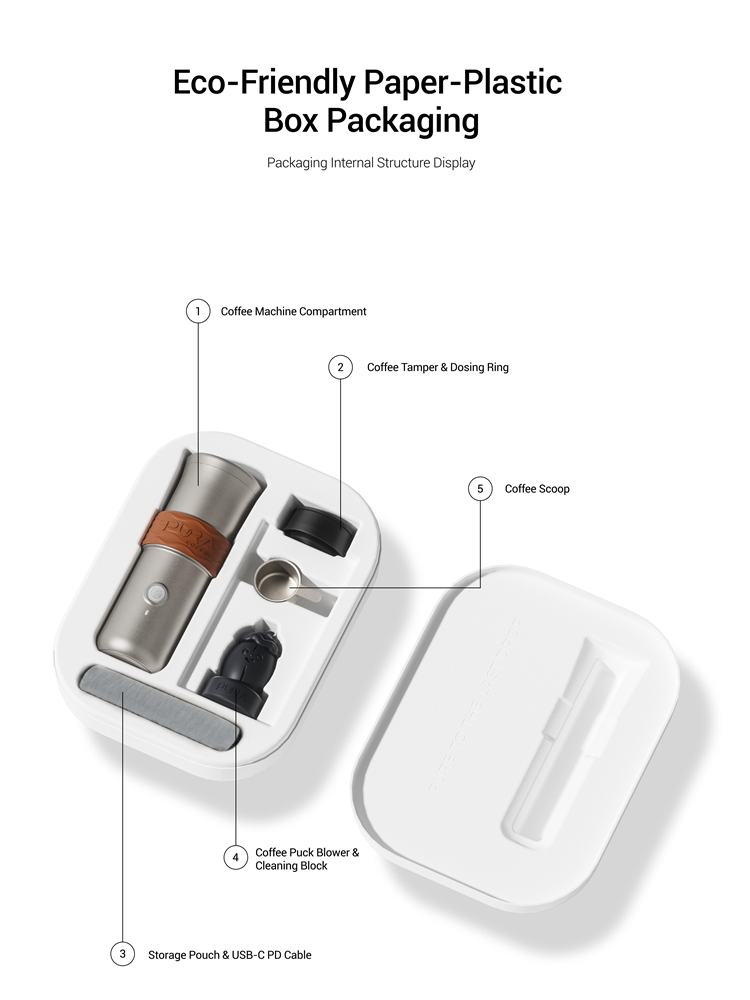
What’s in the box?
Neo Pro, tamper, dosing ring, scoop, USB-C PD cable, storage pouch, and two guide cards. The capsule adapter is optional.
What should I do before the first brew?
Charge the device fully, which takes approximately 2 hours until the halo turns solid green. Pair it with the PURA app, then run two full tanks of plain water through the system without a capsule or coffee grounds.
Can I brew in the car?
Yes. The 72 mm base fits standard cup holders. Operate only when parked or stopped at a red light, and keep the device upright.
How do I check the battery?
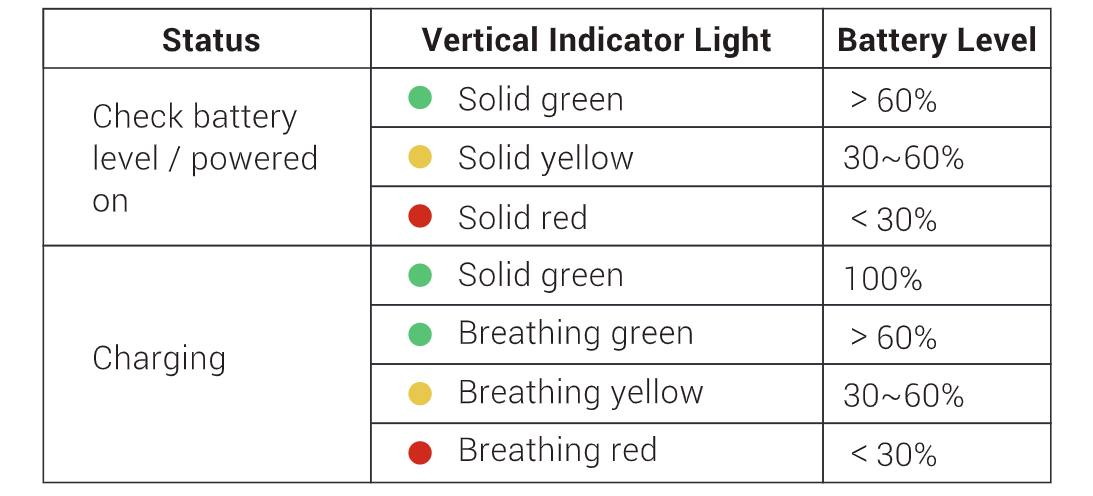
When checking the battery level or powering on: solid green indicates >60%; solid yellow indicates 30–60%; solid red indicates <30%.
Why do I need to short-press, then long-press within 2 seconds to power on?
It prevents accidental activation. The device also shuts down automatically after 5 minutes of inactivity.
Brewing, App & Smart Features
What can Brew OS do today.
Today, Brew OS supports photo-to-curve suggestions, Brew Cards covering grind size, dose and curve, and programmable multi-stage profiles.
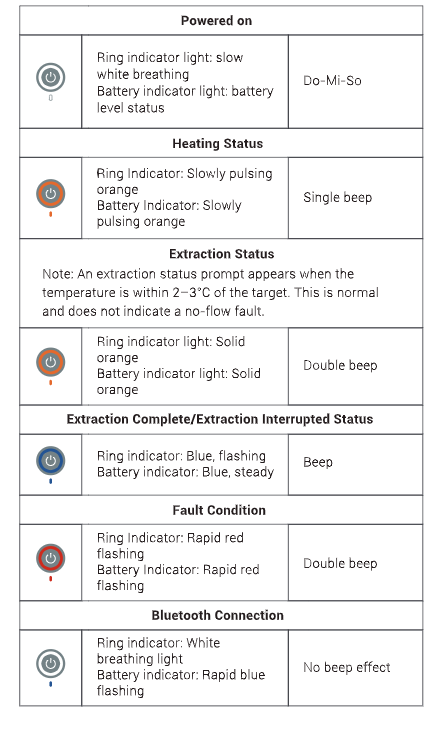
What do the light-ring colors mean?
White breathing: Power-on / Bluetooth connected; orange breathing: Heating; solid orange: Brewing (appears approximately 2–3°C below the target temperature and is normal); blue rolling: Self-check; fast red flashing: Fault.
Can I edit the extraction curve myself?
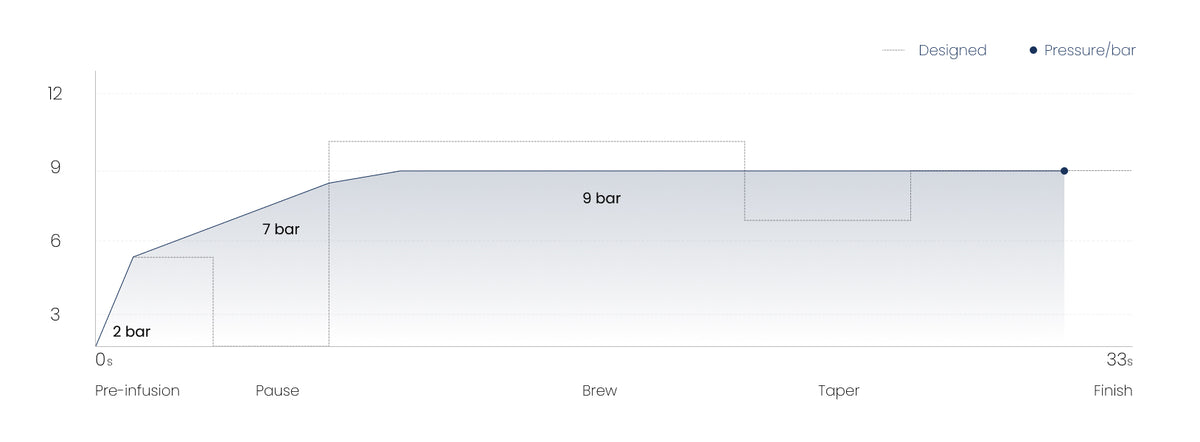
Yes. Advanced users can program up to 8 stages of temperature, pressure and time in the app. The signature five-act curve is your starting point, not the limit of what can be adjusted.
What else does the app do?
The app supports remote start and stop, a recipe library and community downloads, light-ring customization, device monitoring for battery, temperature and brew count, AI bean-pairing suggestions and Bluetooth OTA firmware updates.
Cleaning, Safety & Troubleshooting
Why does tilting trigger an alarm and stop the brew?
A six-axis gyroscope detects excessive tilt and stops brewing to help prevent burns, spills, and dry heating. Keep the device upright.
How do I clean the Neo Pro after use?
Discard the grounds or capsule. Rinse and dry all removable parts, then air-dry the brew chamber. Do not immerse the body, use a dishwasher, or use abrasive cleaners.
What should I never do?
Do not immerse the body, use a dishwasher or abrasive cleaner, charge above 45°C, or use a damaged cable. For long-term storage, keep the battery around 50%.
Something’s wrong—what are the quick fixes?
Won’t start: charge for 15 minutes. Slow brew: use a coarser grind or less tamping. Weak flavor: follow the Brew Card or use less water. Bluetooth failure: reconnect within 3 m. Leaks: tighten the basket and check the seal.
The halo turns red and indicates overheating: what should I do?
Click once to clear the alert and check the water level. If the alert remains, stop using the device and let it cool for about 30 minutes. This is a protection function.
What is the best way to charge?
A 45 W USB-C PD charger is fastest. A standard 5 V / 1 A adapter also works, but more slowly. The input rating on the base is 20 V / 1.7 A maximum.
How large is the battery, and how powerful is the heating?
The device uses a 34.56 Wh battery pack rated at 10.8 V and 9,600 mAh, delivering up to 120 W of heating power.
What is the Neo Pro warranty?
Neo Pro and Neo Pro Titanium include a 2-year limited hardware warranty from the date of delivery, covering manufacturing defects under normal use. It does not cover accident, misuse, water damage beyond rated protection, or unauthorized disassembly. Full terms live on our Refund policy. Email support@puracoffee.com for warranty help.